a-zsoft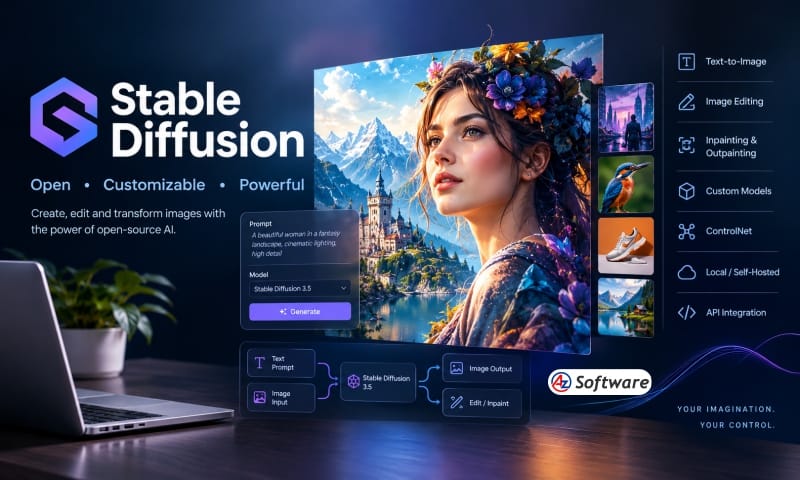
Introduction: Stable Diffusion - AI Image Generator & Open AI Model
Stable Diffusion is an open generative AI image technology developed by Stability AI for creating and transforming images from text prompts and other visual inputs. Unlike many hosted AI image generators, Stable Diffusion can be downloaded and run locally, customized, fine-tuned and integrated into applications.
Its latest major model family is Stable Diffusion 3.5, which includes Large, Large Turbo, Medium and Flash variants designed for different balances of quality, speed and hardware requirements.
AI Category : AI Image Generator
Secondary Categories :
AI Art & Design, AI Creative Tools, AI Developer Tools, AI Content Creation
What It Can Do :
Stable Diffusion can be used for:
- Text-to-image generation
- AI artwork creation
- Photorealistic image generation
- Digital illustrations
- Concept art
- Character creation
- Product visualization
- Marketing graphics
- Image variations
- Image-to-image generation
- Image transformation
- Inpainting
- Outpainting
- Image editing
- Custom model training
- Fine-tuning
- ControlNet-based image control
- Local/self-hosted image generation
- AI application development
- API-based image generation
It is also particularly valuable to technically capable users because the models can be integrated into custom workflows rather than being limited to a single proprietary interface.
Key Features :
1. Text-to-Image Generation
Generate images from natural-language prompts. Stable Diffusion 3.5 Large is designed for high-quality generation and strong prompt adherence.
2. Multiple Model Variants
The Stable Diffusion 3.5 family includes several models:
- Stable Diffusion 3.5 Large – highest-quality base model
- Stable Diffusion 3.5 Large Turbo – faster generation
- Stable Diffusion 3.5 Medium – balance between quality, speed and hardware requirements
- Stable Diffusion 3.5 Flash – faster generation based on the Medium model
3. Local / Self-Hosted Generation
One of Stable Diffusion’s biggest advantages is that models can be downloaded and run on compatible local hardware instead of requiring every generation to happen through a cloud service. Stability AI specifically describes the SD 3.5 models as customizable and capable of running on consumer hardware.
4. Customization
Stable Diffusion is highly customizable. Developers and advanced users can modify models, build workflows and create specialized versions for particular visual styles or subjects.
5. Image-to-Image
Use an existing image as a starting point and transform it according to a prompt.
6. Inpainting
Modify selected portions of an existing image while retaining the surrounding composition.
7. ControlNet
Stable Diffusion supports ControlNet-based workflows, allowing additional structural information such as depth, edges and poses to influence the generated image. Stability AI provides ControlNet models for SD 3.5 Large.
8. Fine-Tuning
Advanced users can customize models for specific subjects, styles and use cases.
9. Open Ecosystem
Stable Diffusion has a large ecosystem of models, tools, interfaces and workflows. The official SD 3.5 implementation can be used with tools such as ComfyUI, Diffusers and other inference environments.
10. API Integration
Developers can access Stable Diffusion models through the Stability AI API and integrate image generation into their own software and applications.
11. High-Quality Prompt Adherence
Stable Diffusion 3.5 Large uses an MMDiT architecture and is designed for improved image quality and prompt adherence.
12. Faster Generation
Stable Diffusion 3.5 Large Turbo and Flash are optimized for faster generation. Large Turbo can generate high-quality images in four steps, while Flash is a distilled version of Medium designed for fast generation.
13. Consumer Hardware Support
The Medium model is specifically designed to provide a balance of quality and customization while being suitable for consumer hardware.
14. GPU Optimization
TensorRT-optimized SD 3.5 models are available for NVIDIA RTX GPUs, with Stability AI reporting significant speed improvements and reduced VRAM requirements on supported hardware.
Pricing :
Stable Diffusion has a somewhat unusual pricing structure because the models themselves can be used free under the Stability AI Community License for eligible users, while hosted/API usage is charged separately.
Local / Self-Hosted Models
Free for research and non-commercial use, and for commercial use by individuals and organizations with less than US$1 million in annual revenue, subject to the Community License terms. Organizations above that threshold need an Enterprise license.
Stability AI API
The Stability AI Developer Platform uses a credit system:
1 credit = US$0.01
Current API pricing includes:
Model | Credits / Image |
Stable Diffusion 3.5 Large | 6.5 |
Stable Diffusion 3.5 Large Turbo | 4 |
Stable Diffusion 3.5 Medium | 3.5 |
Stable Diffusion 3.5 Flash | 2.5 |
Stability AI currently provides 25 free API credits for getting started.
Free / Paid :
Free + Paid API / Enterprise
The model itself can be freely used under the applicable Community License for eligible users, while hosted API usage and enterprise licensing are paid.
Important: This is why I would not label Stable Diffusion simply as “Free” in your directory. Freemium / Free + Paid API is more accurate.
Platform :
- Windows
- macOS
- Linux
- Local / Self-hosted
- Web through third-party interfaces
- Cloud APIs
- Developer environments
Stable Diffusion is not tied to a single operating system or web interface. Its official model ecosystem supports local and programmatic use, while interfaces such as ComfyUI provide graphical workflows.
Best For :
- AI artists
- Digital artists
- Graphic designers
- Game developers
- Concept artists
- Illustrators
- Photographers
- Content creators
- AI researchers
- Developers
- Creative agencies
- Businesses needing custom AI image workflows
- Advanced AI users
It is particularly suitable for users who want control, customization and local deployment, rather than simply using a ready-made online image generator.
Alternatives :
- Midjourney
- Adobe Firefly
- Leonardo.Ai
- Ideogram
- DALL·E / OpenAI image generation
- Google Gemini
- Flux
- Canva AI
Related Software :
- ComfyUI
- AUTOMATIC1111
- Hugging Face
- Replicate
- Stability AI API
- Adobe Photoshop
- Krea
Our Verdict :
Stable Diffusion remains one of the most important technologies in the AI image-generation ecosystem, particularly for users who want control rather than a closed, subscription-only platform.
Its biggest strength is its open and highly customizable ecosystem. Users can run models locally, experiment with different checkpoints and workflows, fine-tune models, use ControlNet and integrate image generation into their own applications. The SD 3.5 family also provides different model sizes and speed/quality options, making it more flexible than a single-model image generator.
The trade-off is complexity. Stable Diffusion is not as beginner-friendly as Midjourney, Adobe Firefly or Ideogram. Getting the best results locally can require a capable GPU, model management, workflow configuration and some technical knowledge.
For developers, AI enthusiasts and professional creators who want maximum control, however, Stable Diffusion remains an exceptionally powerful choice.
Overall Rating: 4.8/5
Verdict: ⭐ Highly Recommended
How to Use :
Visit the above link, sign-up to explore and and start using.
Share this Software