Publisher's Description: Invoice or Bill Format in Microsoft Excel: Customizable, Professional & Easy to Use.
Creating invoices is an essential part of any business. Whether you run a small shop, freelance service, wholesale business, or startup company, a well-designed invoice reflects professionalism and builds trust.
One of the most powerful and flexible tools to create invoices is Microsoft Excel. With Excel, you can design fully customized invoice or bill formats that are automatic, accurate, and professional.
In this blog, it is explained how invoice formats can be created in Excel, what features can be included, and how we can help you with ready-made and customized formats.
Why Choose Microsoft Excel for Invoice/Bill Format?
Excel is widely used for business calculations and record-keeping. It offers:
Easy customization
Automatic calculations
Professional layout design
Formula-based automation
Cost-effective solution (no expensive billing software needed)
Suitable for small to medium businesses
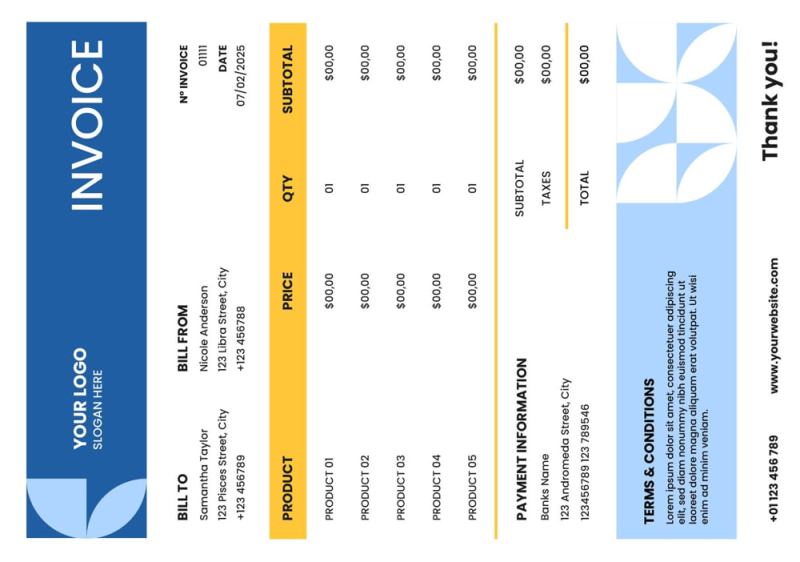
Features You Can Include in an Excel Invoice Format
A professionally designed invoice in Excel can include the following:
1. Company Details Section
Company Name
Company Logo
Full Address
Contact Details
Email & Website
GST / Tax Number
Your company logo and branding can be fully customized to maintain your brand identity.
2. Customer Details Section
Customer Name
Address
Contact Number
GST Number (if applicable)
Invoice Number (Auto Generated)
Invoice Date
Invoice numbers can be auto-generated to maintain proper records.
3. Product / Service Details Table
Item Description
HSN/SAC Code (if required)
Quantity
Rate
Amount
Tax %
Tax Amount
Total
All calculations can be automated using formulas, reducing manual errors.
4. Automatic Calculations
Excel allows you to automate:
Subtotal
CGST / SGST / IGST
Discount (Percentage or Fixed)
Additional Charges
Round Off
Grand Total
Once you enter quantity and rate, everything calculates automatically.
5. Number to Words Conversion
The total amount can automatically convert into words such as:
₹ 25,450 Twenty-Five Thousand Four Hundred Fifty Only
This adds professionalism and is often required for official billing.
6. Declaration & Terms Section
You can include:
Declaration statement
Bank Details
Payment Terms
Authorized Signatory Section
All formatted neatly and professionally.
7. Print-Ready & PDF Friendly
The invoice can be:
Properly aligned for A4 print size
Print-ready format
Easily saved as PDF
Shared via WhatsApp or Email
Customization Options Available
Every business is different. That’s why invoice formats can be customized based on:
Business type (Retail, Wholesale, Service, Freelancer)
Tax structure
Multi-tax columns
With or without GST
Simple or detailed layout
Single-page or multi-page invoice
Color theme matching your brand
Automated summary sheets
Sales reports and monthly reports
Ready-Made Invoice Formats Available
If you don’t want to create from scratch, we provide:
You just need to enter details — everything else works automatically.
Custom Invoice Format as per Your Requirement
Need something specific?
Also following can be provided:
Fully customized invoice formats
Advanced formulas
Auto invoice numbering
Customer database integration
Product list with dropdown selection
Dashboard for sales tracking
Multi-sheet billing systems
Why a Professional Excel Invoice Matters
A proper invoice format:
Builds brand credibility
Reduces calculation errors
Saves time
Maintains proper records
Helps during tax filing
Looks professional to customers
Conclusion:
A well-designed invoice or bill format in Microsoft Excel is a powerful, flexible, and affordable solution for businesses of all sizes.
Whether you need a ready-made format or a fully customized invoice system, We can help you create a professional solution tailored to your needs for onetime payment. If you’re interested, feel free to contact us.

 a-zsoft