a-zsoft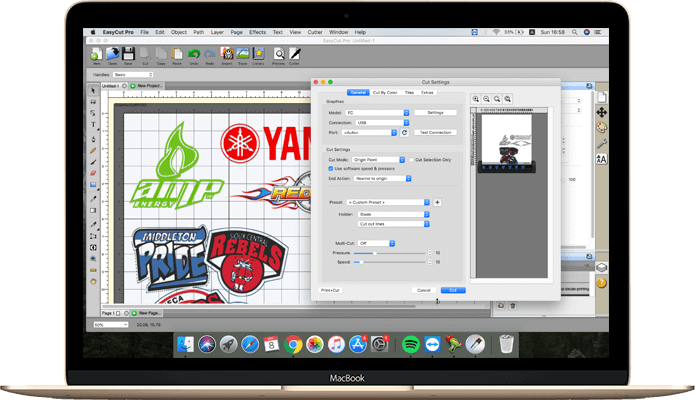
Supported Platforms:
Supported Platforms: Win and macOS
Licence Type: FreeTrial
Publisher's Description: EasyCut Pro
Software Description:
EasyCut Pro is one of the most popular and widely trusted Vinyl Cutting applications for Mac and Windows. It is perfect for small as well as large printing and cutting businesses. The new version brings above all a significant increase in speed for all operations thanks to multi-core optimizations.
Features:
- Draw and Edit Shapes
Draw your own shapes directly on the mat, Create original designs very easily using various shapes and drawing tools. you’ll find that the design solutions are endless.
- Enhanced Text Layout
WYSIWYG text layout and design with all your fonts on your computer, 4 different types of type tools and add a variety of effects to text objects.
- Node Editing
Powerful tools designed to edit nodes that can enhance vector objects. Supports many different types of transforming and editing nodes, curves, and etc.
- Import most file formats
Import a wide range of vector based file formats, such as DXF, PLT, PDF, AI, SVG, EPS, WPC, GSD, PNG, SCUT, FCM and so on.
- Vectorize Images
Unmatched image vectorization – Quickly convert any raster images (JPG, PNG, GIF, BMP, TIFF) into cuttable vector path designs in just a few clicks.
- Special Effects
A variety of effects can be applied to your designs, such as 3D Rotate, Bulge, Lattice, Wrapper, Title Crawl, Canned, Shadow, Knockout, 3D Extrude, Wave, and etc.
- Create Rhinestone
Easily create custom rhinestone designs that can be output with a vinyl cutter, You can specify stone size and spacing to make your own rhinestone template.
- Nesting
Powerful nesting with advanced optimisation techniques give unparalleled material savings. Start optimizing and minimise material waste!
- Weld Shapes/Text
Welding will take two or more selected overlapping images and join them together into one single shape. There are two ways to weld overlapping shapes.
- Tiles
If your design is wider than the maximum cutting width of your cutting machine, you can use this to fast and accurate split up the design into smaller tiles.
- Weeding Vinyl
Remove the excess vinyl from in between shapes and around their respective edges. This feature will add a weeding border around the selected shapes.
- Shapes Library
Gives you instant, easy access to over 350 pre-made shapes in the built in shapes library for Free. Shape cutting has never been easier!
And more…
How to Get
Visit the above link, to download directly for trial.
Share this Software