a-zsoft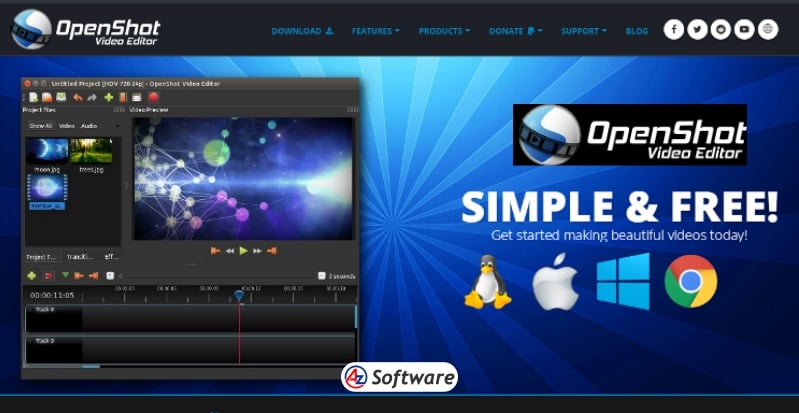
Supported Platforms:
Supported Platforms:
- Windows
- macOS
- Linux
Licence Type: Free
Performance Insights:
- Works well for small to medium projects
- May lag or freeze with high-resolution (4K) videos
- Rendering speed is slower compared to premium software
For best performance, a system with at least 8GB RAM and a decent processor is recommended.
Rating: ⭐⭐⭐⭐☆ (4/5)
Introduction:
When it comes to free and open-source video editing software, OpenShot Video Editor stands out as one of the most accessible options for beginners and casual creators. Designed with simplicity in mind, OpenShot offers a clean interface combined with essential editing tools that make video creation easy without a steep learning curve.
Whether you’re a YouTuber, student, or hobbyist, OpenShot aims to provide a powerful yet lightweight solution for basic to intermediate video editing needs. In this review, we’ll explore its features, performance, and whether it’s worth using in 2026.
Key Features
OpenShot comes packed with a variety of useful features, especially considering it is completely free and open-source.
- Drag-and-drop interface for easy editing
- Unlimited layers for video, audio, and images
- Built-in title editor with 3D animations
- Video effects like brightness, contrast, chroma key (green screen)
- Keyframe animations for smooth transitions and effects
- Wide format support (MP4, AVI, MOV, etc.)
- Audio waveform visualization for precise editing
- Cross-platform support (Windows, macOS, Linux)
These features make OpenShot a strong contender among beginner-friendly video editing tools.
Pros and Cons
Pros:
✔️ Completely free and open-source
✔️ Easy to use for beginners
✔️ Supports multiple platforms
✔️ No watermarks on exported videos
✔️ Regular updates and active community
Cons:
❌ Performance can be slow on large projects
❌ Limited advanced editing features
❌ Occasional bugs or crashes
❌ Not ideal for professional-level editing
User Interface & Ease of Use
One of OpenShot’s biggest strengths is its simple and intuitive user interface. The layout is clean, with a timeline at the bottom, preview window on the right, and media library on the left.
Beginners will appreciate the drag-and-drop functionality, which allows users to quickly add clips, images, and audio files. Basic editing tasks like trimming, cutting, and adding transitions can be done with minimal effort.
However, while it’s great for newcomers, users looking for advanced controls may find the interface somewhat limited compared to professional tools.
Pricing
One of OpenShot’s biggest advantages is its pricing model:
- 100% Free
- Open-source
- No subscription required
- No hidden charges
This makes it an excellent choice for users who want a cost-effective video editing solution.
Best For
OpenShot is best suited for:
- Beginners learning video editing
- Students and educators
- YouTubers creating simple content
- Users with low to mid-range PCs
- Anyone looking for a free video editor without watermarks
Alternatives
If OpenShot doesn’t meet your needs, you can consider:
- Shotcut (more advanced open-source editor)
- DaVinci Resolve (professional-grade editing)
- VSDC Free Video Editor (lightweight Windows option)
- Lightworks (professional editing tool with free version)
FAQs
- Is OpenShot really free? Yes, OpenShot is completely free and open-source with no hidden costs.
- Does OpenShot add a watermark? No, exported videos do not include any watermark.
- Can OpenShot edit 4K videos? Yes, but performance may be slow depending on your system.
- Is OpenShot good for YouTube videos? Yes, it’s a great choice for simple YouTube content creation
Final Verdict
OpenShot is an excellent starting point for anyone new to video editing. Its simplicity, free access, and cross-platform support make it a popular choice among beginners.
While it may not replace professional tools for complex projects, it delivers solid performance for basic editing tasks.
How to Get
Visit the above link, to download directly.
Share this Software