a-zsoft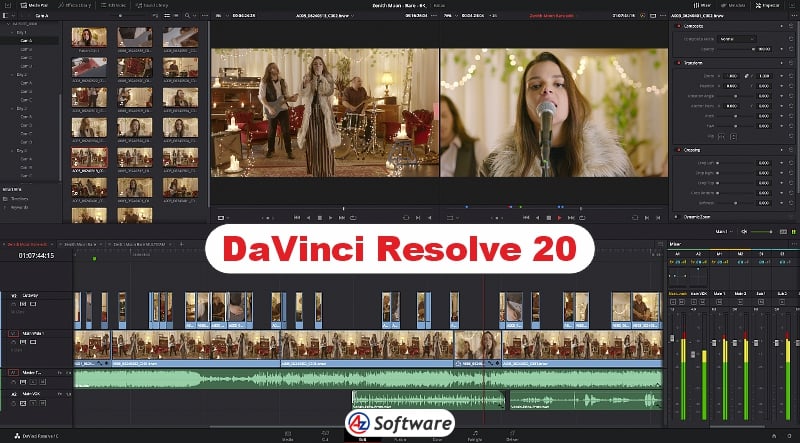
Supported Platforms, Performance & System Requirements.
DaVinci Resolve is a resource-intensive video editing software, designed for high-performance systems.
Supported Platforms:
- Windows
- macOS
- Linux
Performance Insights:
- Excellent performance on high-end systems
- Supports GPU acceleration for faster rendering
- Handles 4K, 6K, and 8K footage smoothly (with proper hardware)
- May struggle or not run well on low-end PCs
For optimal performance, a system with 16GB+ RAM, SSD storage, and a dedicated GPU is recommended.
Rating: ⭐⭐⭐⭐⭐ (4.8/5)
Introduction:
When it comes to professional video editing software, DaVinci Resolve is widely regarded as one of the most powerful tools in the industry. Developed by Blackmagic Design, it is used by filmmakers, video editors, and content creators worldwide for high-end production work.
What sets DaVinci Resolve apart is its all-in-one solution—combining video editing, color correction, visual effects, and audio post-production into a single platform. In this review, we’ll explore its features, performance, and whether it’s worth using in 2026.
Key Features:
DaVinci Resolve offers an extensive range of professional-grade features:
- Advanced video editing tools with multi-track timeline
- Industry-leading color grading capabilities
- Fusion visual effects (VFX) for motion graphics and compositing
- Fairlight audio editing suite for professional sound design
- 8K video editing support
- Multi-user collaboration tools
- AI-powered tools (auto color, object tracking, face recognition)
- Cross-platform support (Windows, macOS, Linux)
These features make it a complete post-production solution.
Pros and Cons
Pros:
✔️ Professional-grade editing and color correction
✔️ Free version available with powerful features
✔️ All-in-one platform (editing, VFX, audio)
✔️ Widely used in the film and TV industry
✔️ Frequent updates with new features
Cons:
❌ Steep learning curve for beginners
❌ Requires a powerful computer
❌ Heavy software with large installation size
❌ Some advanced features locked in paid version
User Interface & Ease of Use
DaVinci Resolve has a modern but complex interface, divided into dedicated workspaces such as Media, Cut, Edit, Fusion, Color, and Fairlight.
While this modular design is extremely powerful, it can feel overwhelming for beginners. Each section is designed for a specific task, which means users need time to learn the workflow.
However, once mastered, the interface becomes highly efficient and is preferred by professionals for its precision and control.
Pricing
DaVinci Resolve offers both free and paid versions:
- Free Version:
- Includes most professional features
- Suitable for the majority of users
- DaVinci Resolve Studio (Paid):
- One-time purchase
- Includes advanced AI tools, HDR grading, and more
This pricing model makes it one of the most valuable tools in the industry.
Best For
DaVinci Resolve is best suited for:
- Professional video editors
- Filmmakers and production studios
- Advanced YouTubers and content creators
- Color grading specialists
- Users with high-performance computers
FAQs
- Is DaVinci Resolve really free?
Yes, the free version includes most features needed for professional editing. - Is DaVinci Resolve good for beginners?
It can be challenging at first, but beginners can learn it with practice. - What is DaVinci Resolve best known for?
It is especially معروف for its advanced color grading tools. - Does DaVinci Resolve require a powerful PC?
Yes, it performs best on systems with strong CPU, GPU, and sufficient RAM.
Alternatives
If DaVinci Resolve feels too complex or heavy, you can consider:
- OpenShot (beginner-friendly editing)
- Shotcut (balanced free editor)
- VSDC Free Video Editor (lightweight Windows editor)
- Lightworks (professional editing with simpler workflow)
Final Verdict
DaVinci Resolve is arguably the most powerful free video editing software available today. Its professional-grade tools, combined with a robust free version, make it an unbeatable choice for serious creators.
However, it’s not ideal for beginners or low-end systems due to its complexity and hardware requirements.
How to Get
Visit the above link, to download directly.
Share this Software