a-zsoft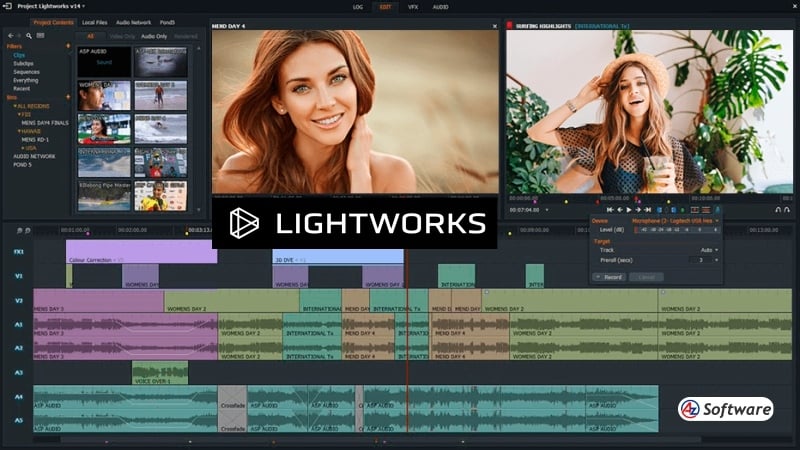
Supported Platforms, Performance & System Requirements.
Lightworks is designed to deliver efficient performance across different systems, though it performs best on modern hardware.
Supported Platforms:
- Windows
- macOS
- Linux
Performance Insights:
- Smooth playback and editing on mid to high-end systems
- Optimized for real-time editing
- Handles HD and 4K footage effectively
- May require adjustments on lower-end systems
A system with 8–16GB RAM and a capable CPU/GPU is recommended for optimal performance.
Rating: ⭐⭐⭐⭐☆ (4.3/5)
Introduction:
With a history spanning decades, Lightworks Video Editor is one of the most established professional video editing software in the industry. It has been used in the editing of major Hollywood films, making it a trusted tool among professionals.
Lightworks offers a powerful editing system combined with a customizable interface, catering to both beginners and experienced editors. In this review, we’ll explore its features, performance, and whether Lightworks is still worth using in 2026.
Key Features:
Lightworks provides a range of advanced features designed for professional editing:
- High-precision timeline editing
- Multi-track video editing support
- Real-time effects and transitions
- Advanced trimming tools for precise cuts
- Wide format and codec support
- Export options for YouTube and social media
- Customizable user interface
- Cross-platform support (Windows, macOS, Linux)
These features make Lightworks suitable for professional-level video production.
Pros and Cons
Pros:
✔️ Professional-grade editing tools
✔️ Long-standing reputation in the film industry
✔️ Free version available
✔️ Highly customizable interface
✔️ Precise timeline editing
Cons:
❌ Steep learning curve for beginners
❌ Limited export options in free version
❌ Some features locked behind paid plans
❌ Interface can feel outdated to some users
User Interface & Ease of Use
Lightworks features a unique and highly customizable interface, which may feel very different compared to other video editors.
While professionals appreciate its precision and flexibility, beginners may find it difficult to learn initially. The workflow is optimized for speed and efficiency, but it requires time to master.
Once users become familiar with the interface, Lightworks offers a very smooth and professional editing experience.
Pricing
Lightworks offers both free and paid options:
- Free Version:
- Basic editing features
- Limited export formats and resolution
- Lightworks Create / Pro (Paid):
- Advanced features and export options
- Suitable for professional use
This tiered pricing allows users to start free and upgrade as needed.
Best For
Lightworks is best suited for:
- Professional video editors
- Filmmakers and advanced creators
- Users looking for precise editing tools
- Intermediate users willing to learn
- Cross-platform users needing flexibility
FAQs
- Is Lightworks free to use?
Yes, there is a free version, but it has limited export options. - Is Lightworks good for beginners?
It can be challenging for beginners due to its unique interface. - What is Lightworks best known for?
It is known for its use in professional film editing. - Does Lightworks support 4K editing?
Yes, but full export features may require a paid plan.
Alternatives
If Lightworks doesn’t fit your workflow, you can consider:
- OpenShot (beginner-friendly editor)
- Shotcut (flexible open-source tool)
- DaVinci Resolve (advanced all-in-one professional editor)
- VSDC Free Video Editor (lightweight Windows option)
Final Verdict
Lightworks remains a powerful and reliable video editing software, especially for users seeking professional-level tools. Its long-standing reputation and precision editing capabilities make it a strong contender in the market.
However, its learning curve and limitations in the free version may not suit beginners.
How to Get
Visit the above link, to download directly.
Share this Software