a-zsoft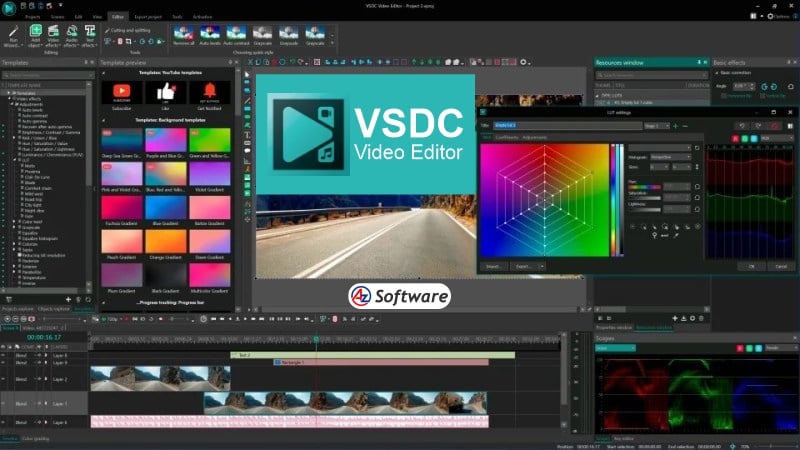
Supported Platforms, Performance & System Requirements.
One of VSDC’s biggest strengths is its low system requirements, making it ideal for older or less powerful computers.
Supported Platforms:
- Windows only
Performance Insights:
- Runs smoothly on low-end PCs
- Handles HD editing efficiently
- Limited performance for heavy 4K projects
- Hardware acceleration available in Pro version
For best results, a system with at least 4–8GB RAM is sufficient for most tasks.
Rating: ⭐⭐⭐⭐☆ (4.1/5)
Introduction:
For users looking for a lightweight yet powerful video editing software, VSDC Free Video Editor is a popular choice—especially among Windows users. Known for its non-linear editing capabilities and low system requirements, VSDC offers a wide range of features without demanding high-end hardware.
Unlike many free editors, VSDC provides advanced tools like color correction, visual effects, and even basic motion tracking, making it suitable for both beginners and intermediate users. In this review, we’ll explore whether VSDC Free Video Editor is worth using in 2026.
Key Features:
VSDC Free Video Editor includes a variety of features that make it stand out among free tools:
- Non-linear video editing system for flexible workflows
- Wide range of video effects and filters
- Color correction and blending modes
- Chroma key (green screen support)
- Built-in screen recorder and video capture tool
- Motion tracking (available in advanced versions)
- Supports multiple file formats
- Optimized for low-end PCs
These features make VSDC a versatile editing tool despite being free.
Pros and Cons
Pros:
✔️ Completely free version available
✔️ Lightweight and works on low-end systems
✔️ No watermark on exported videos
✔️ Advanced editing features for a free tool
✔️ Built-in screen recording capability
Cons:
❌ Available only on Windows
❌ Interface can feel confusing at first
❌ Some advanced features require Pro version
❌ Export speed can be slower without hardware acceleration
User Interface & Ease of Use
VSDC’s interface is feature-rich but not very beginner-friendly. Unlike traditional timeline-based editors, it uses a non-linear system that may feel unusual at first.
New users might find the layout cluttered, but once familiar, it provides greater flexibility and control over editing elements. The software also includes tutorials and guides to help users get started.
Pricing
VSDC offers both free and paid versions:
- Free Version:
- Includes most essential editing tools
- Suitable for basic to intermediate editing
- VSDC Pro Version:
- Subscription-based
- Unlocks advanced features like motion tracking and hardware acceleration
This flexible pricing makes it accessible for a wide range of users.
Best For
VSDC Free Video Editor is best suited for:
- Windows users with low-end PCs
- Beginners willing to learn advanced tools
- YouTubers creating simple to moderate content
- Screen recording and tutorial creators
- Budget-conscious users
FAQs
- Is VSDC Free Video Editor really free?
Yes, it offers a free version with most essential features. - Does VSDC add a watermark?
No, videos exported from the free version do not have a watermark. - Is VSDC good for low-end PCs?
Yes, it is optimized to run smoothly on low-performance systems. - Can VSDC edit 4K videos?
Yes, but performance may be limited on weaker hardware.
Alternatives
If VSDC doesn’t fully meet your needs, you can consider:
- OpenShot (simpler interface, cross-platform)
- Shotcut (more flexible open-source editor)
- DaVinci Resolve (high-end professional editing)
- Lightworks (professional tool with advanced workflow)
Final Verdict
VSDC Free Video Editor is an excellent choice for users who want advanced features without needing powerful hardware. While the interface may take time to master, the software delivers impressive capabilities for a free tool.
It’s particularly ideal for Windows users looking for a balance between performance and functionality.
How to Get
Visit the above link, to download directly.
Share this Software